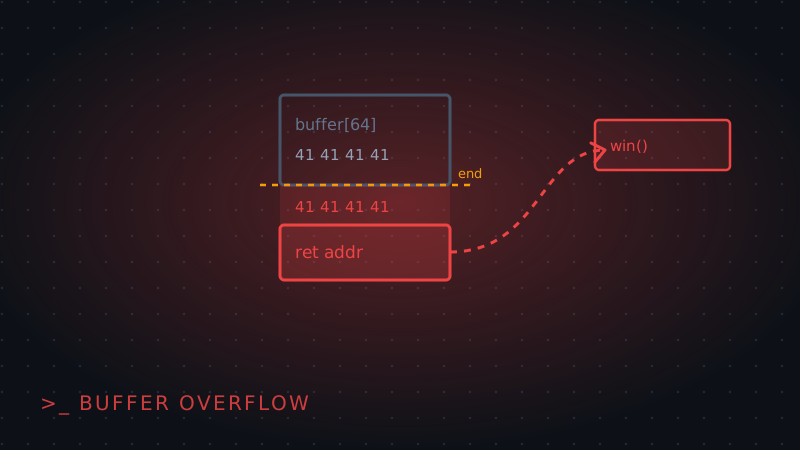
Most beginner pwn challenges boil down to the same bug: a program reads input into a fixed-size buffer with something like gets() or strcpy() and never checks whether the input actually fits. Feed it more bytes than the buffer holds, and the extra bytes spill into whatever memory sits right after it on the stack — including, eventually, the address the function returns to when it's done.
Finding the vulnerable read
Look for an input function with no length limit: gets(buffer), scanf("%s", buffer), or a strcpy from attacker-controlled data. Any of these will happily write past the end of a buffer declared as, say, char buffer[64] — the function has no idea how big the buffer actually is.
Finding the offset to the return address
Rather than guessing how many bytes it takes to reach the return address, send a known pattern and see where the program crashes. pwntools' cyclic() generates a non-repeating sequence so any 4 or 8 bytes in it identify a unique offset:
python3 -c "from pwn import cyclic; print(cyclic(200))"Send that output as input, let the program crash, then check what value ended up in the saved return address (visible in a debugger as the crash address) with cyclic_find() — that number is exactly how many bytes of padding you need before you can start controlling what the program does next.
Overwriting the return address
Once you know the offset, build a payload of padding + target_address. The target is usually the address of a function already in the binary that does something useful — printing a flag, spawning a shell, or calling system("/bin/sh"):
payload = b"A" * offset + p64(target_address)p64() (from pwntools) packs the address into the right byte order for the target architecture. When the vulnerable function returns, instead of going back to its caller, execution jumps straight to target_address.
Sending the payload
Connect to the challenge binary (locally or over the network) and send the payload exactly as built — no extra newline or encoding unless the challenge expects one:
from pwn import *
p = remote("target.ctf", 1337)
p.sendline(payload)
p.interactive()
Wrapping up
A buffer overflow is really just "the program trusted a length it never checked." Everything past finding the offset — building the payload, choosing a target address — follows from that one fact. Our PicoCTF Buffer Overflow 0 writeup and its follow-up walk through this exact technique against real challenge binaries, and GDB with pwndbg is the debugger setup you'll want for watching the crash happen.